
The Pokepedia Pokedex tracker stores every catch in browser localStorage on the device where you marked it. Move the data yourself with the Sync dropdown on the tracker toolbar. Pokepedia never stores tracker data on a server and never requires an account.
Step 1

Open /pokedex-tracker on the device that holds the tracker state you want to send. Find the Sync button in the toolbar next to Clear. Click it to open the dropdown.
Step 2
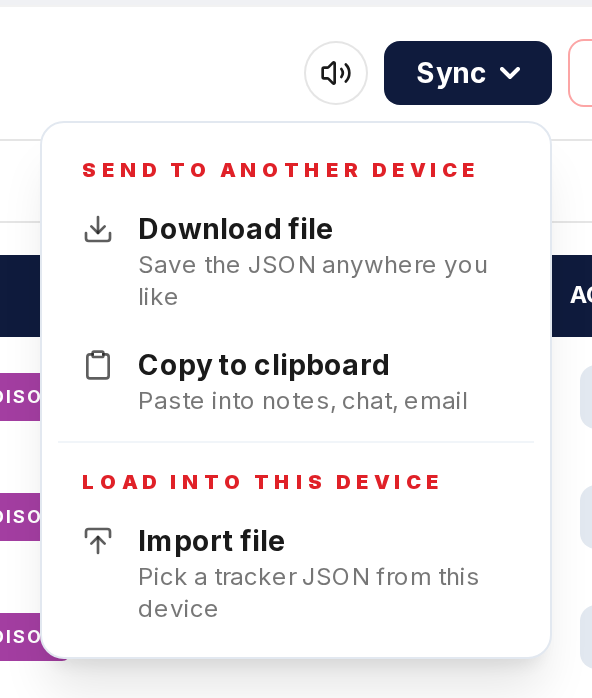
Under the "Send to another device" heading pick one of the options. Share opens the OS share sheet for AirDrop, Drive, Messages, or Mail and only appears when the browser supports file sharing. Download file saves the tracker as a .json file anywhere on disk. Copy to clipboard copies the JSON text so you can paste it into Notes, email, or a chat.
Step 3
Move the JSON to the second device. Share routes it through a drive or messaging app. Download gives you a file to upload to a cloud drive or attach to email. Copy puts the text in the clipboard for pasting into any synced notes app.
Step 4
On the receiving device open /pokedex-tracker, open the Sync dropdown, and pick Import file under "Load into this device". Select the .json file you saved or received. Pokepedia replaces the current tracker data with the imported data after a confirmation prompt.
Step 5
Mark catches on either device going forward. When you want the two in sync again, repeat the send step from whichever device is more up to date. There is no automatic merge, so decide which device is authoritative before importing.