
On Pokepedia, type matchups are shown as damage multipliers inside each cell of the Type Chart at /pokemon-type-chart. The four possible values are 2x, 1x, 1/2x, and 0x.
Step 1

Read the legend above the matrix first. A red 2x cell means the attacker deals double damage to the defender (super effective). A white 1x cell is normal damage. A green 1/2x cell is resisted. A black 0x cell means the move has no effect.
Step 2
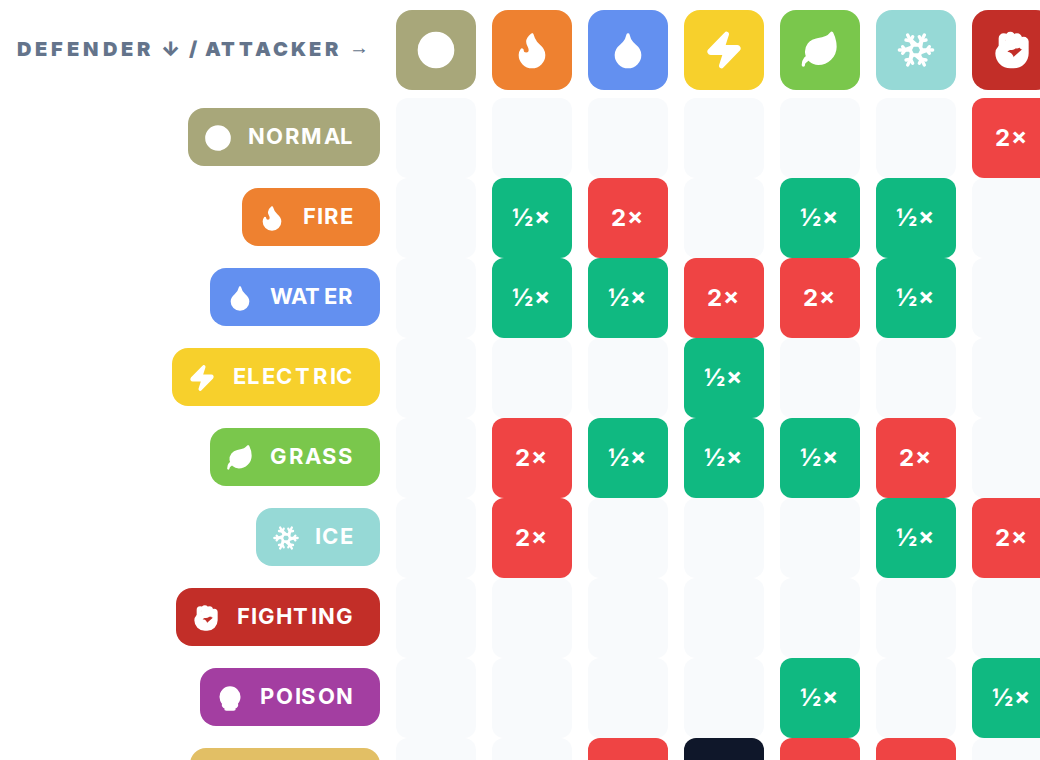
To check a matchup, find the defender type in the left column, then slide across to the attacker column at the top. The cell where they meet is the multiplier. Hover any cell to see the exact matchup label and number.
Step 3

For a plain-English summary per type, use the cards below the matrix. Each card lists Weak to (takes 2x damage), Resists (takes 1/2x damage), and Immune to (takes 0x damage). A dual-type Pokemon stacks these multipliers, so a Fire/Flying Pokemon takes 4x from Rock.