
Every Pokemon has a base stats section showing HP, Attack, Defense, Special Attack, Special Defense, and Speed. Each stat has a number and a visual bar so you can read strengths and weaknesses at a glance.
Step 1

Open any Pokemon's detail page by clicking its card in the Pokedex or going directly to its URL.
Step 2
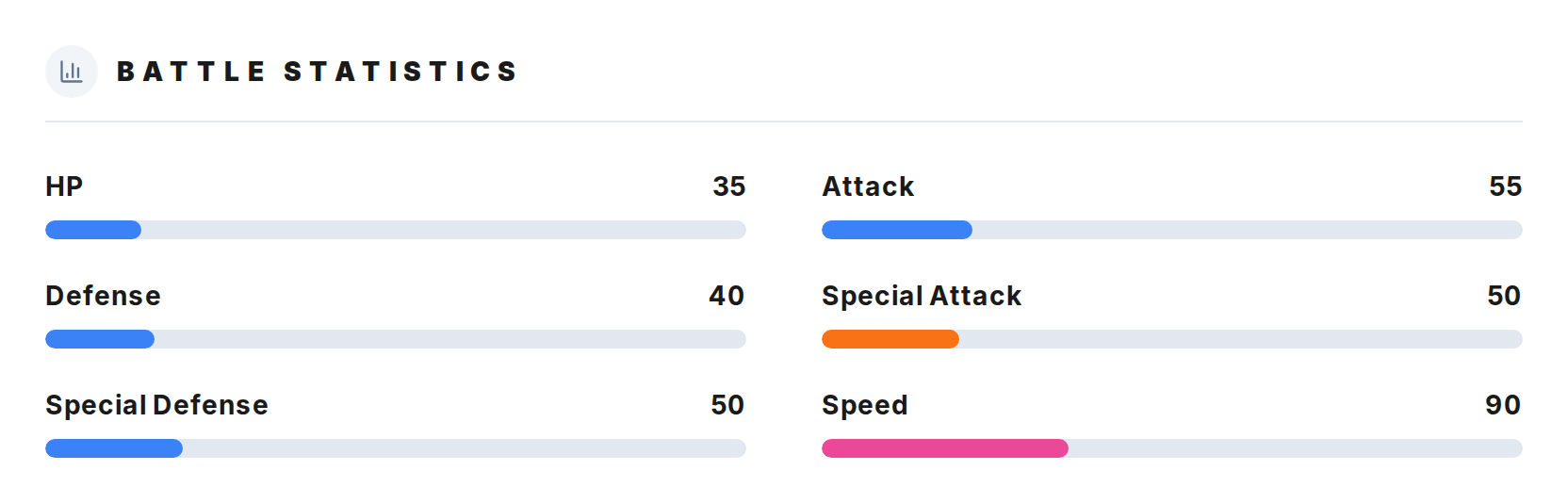
Go to the General tab. The Battle Statistics section shows all six stats with numeric values and bars. Longer bars mean higher stats.
Step 3
The bars make it easy to spot what a Pokemon is good at and where it's weak. A Pokemon with 90 Speed and 40 Defense has a noticeably longer Speed bar.
Step 4
You can use the stats to get a quick read on what a Pokemon does in battle. High Attack and Speed usually means a fast physical hitter. High HP and Defense points to a wall.
Step 5
To compare between Pokemon, use the arrows at the top to flip through adjacent Pokemon, or open a different one in a new tab from the Pokedex.